
Windows PowerShell -f Format Operator
 Introduction to Windows PowerShell -f Format Output My mission on this page is to explain the basics of PowerShell’s -f format operator. We use this operator, -f, to set the column widths in the output. Another way of looking at -f is to control the tab alignment. It has to …
 Microsoft .NET Framework for Windows Server 2008 The word .NET refers not to a network as in computing, but to a net as in fishing. The Framework component acts as a guide for developers to build their applications. For ordinary users all they need to know is that .NET Framework …
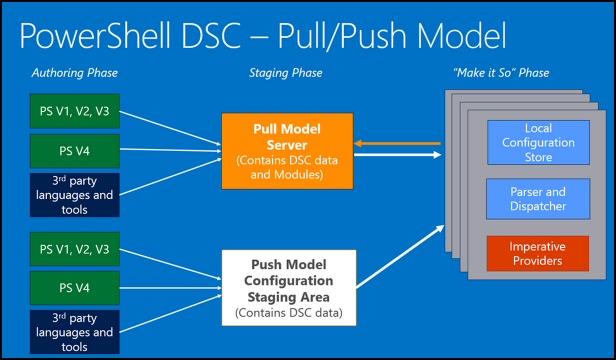 Windows PowerShell 4.0 DSC Here is an introduction to the main new feature of PowerShell 4.0, Desired State Configuration. See how to create 'Nodes' and 'Resources', which will manage your operating system. PowerShell 4.0 New Feature DSC PowerShell Desired State Configuration (DSC) Example Script for DSC PowerShell DSC in Action …
 How PowerShell Can Display a Notification Balloon This is just a fun project to learn about PowerShell functions; in particular, how to make use of .Net objects such as Windows.Forms. Show-BalloonTip Function Planning the Show-BalloonTip Function Code for the Show-BalloonTip Function Researching Windows.Forms Properties ♣ Planning the Show-BalloonTip Function The …
 How to Check Computer UpTime Using PowerShell 3.0 I have received a few surprises when using this WMI script to see when the computer last booted. Some servers have clearly rebooted without me realizing (remembering!). On the other hand, I have seen laptops which the script shows haven’t actually rebooted …
 PowerShell 2.0 ISE Integrated Scripting Engine (GUI) The command line will always be at the heart of PowerShell. However, all scripting languages benefit from a GUI, or an Integrated Scripting Environment (ISE) as Microsoft describes this add-on console. If you merely use PowerShell to issue a few one-line commands then …
 How PowerShell Interacts with Outlook The purpose of this page is to employ PowerShell to GetNameSpace("MAPI"), and thus make it possible to interact with Microsoft's Outlook client. PowerShell with Outlook Planning: PowerShell Interrogates Outlook List Senders' Addresses Instructions: Creating a PowerShell Function Ideas for Analyzing Outlook Emails Another Example Reading …
 Windows PowerShell Scripting – Format-List (fl) Format-List, or FL for short, allows PowerShell to control the output of your main script. Whenever presentation of information is important, pipe the script's output into Format-List (or Format-Table). On this page I will show you examples of this straightforward, but important command. Windows …
 Windows PowerShell 3.0 Version 3 is a major upgrade of PowerShell; it has intellisense features to make newbies sure-footed as they walk through their commands. PowerShell 3.0 also has new structures such as Workflow to make the experts more productive. PowerShell 3.0 New Features What’s New In PowerShell 3.0 Show-Command …
 Scripting Files with PowerShell’s Get-Childitem (gci) Sooner or later you need a script which lists the files in a folder. In DOS we would type: ‘DIR’; the nearest equivalent in PowerShell is gci. The full name behind the gci alias is Get-ChildItem. You can take the comparison further, dir /s …