
Windows Server Performance Monitor – Memory
 Introduction to Memory Bottlenecks If ever your Windows 2003 server is running slowly, then the first place to look for a bottleneck is memory. Another way of looking at server performance, is that machines with plenty of RAM rarely give problems. A bonus of plenty of memory is, that to …
 Guy’s Top 10 Utilities I will be surprised if you don’t find at least one gem amongst this list of tools that have served me well over the last 10 years (and more). Many are completely free, while others offer a free trial. I will be surprised if you don’t …
 Review of SolarWinds APM SolarWinds’ APM (Application Performance Monitor) is particularly useful for inspecting the services and processes on servers such as SQL or Exchange. Try the updated SAM (Server & Application Monitor) Topics for SolarWinds APM Reasons for Experimenting With SolarWinds APM System Requirements for APM Decide Your Initial …
 Review of SolarWinds Orion NPM v10.2 Orion Network Performance Monitor (NPM) is what I call the ‘big tackle’. Big in its power to zoom into network trouble spots, and big in the comprehensive range of checks that it manages. If you are reviewing performance monitors, then download a free trial …
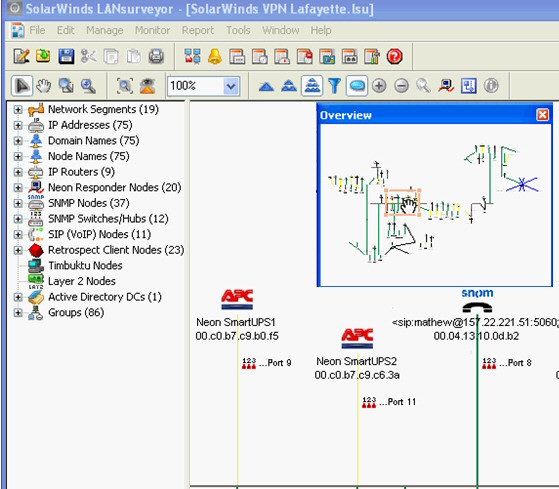 Review of LanSurveyor As its name suggests, LAN Surveyor automatically maps devices on your network. It works by discovering computers and other devices on your network, and then producing comprehensive, easy-to-view diagrams that you can export into Microsoft Visio. Try LanSurveyor now, and get an up-to-date network map in just …
 Problems Making Phone Appointments at the Doctors’ Surgery Doctors’ Phone Service – Guy’s B�te Noire I say again, doctors are the only profession that exceed my expectation. At the other extreme, phone systems consistently disappoint me. This is because I can remember the halcyon days when if you phoned the …
 Introduction to Performance Monitor This is the place to start if you are new to the science of Windows 2003 Performance Monitoring. The purpose of this page is to master the basic techniques of System Monitor (Perfmon.exe). We will explore the buttons and discover how to create traces of server …