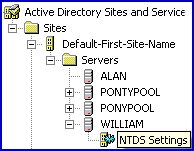
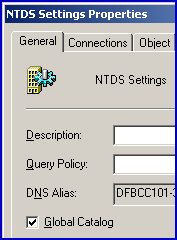
Custom Search Guy recommends: A free desktop tool that monitors, or restarts, your VMware virtual machines. Download your free VM Console Best Practice Ezine #63 Global Catalog ServerIn this issue I would like to feature the Global Catalog as it’s probably the most neglected Windows 2003’s services. As we will see, small organizations don’t need much configuration, whereas large forests running Exchange can improve their performance by judicious placement of Global Catalog Servers. I have three goals for Global Catalog ServerMy goals are to explain why Exchange 2003 needs Global Catalog Server. To find the checkbox, which enables / disables this services. To explain why configuring Global Catalog Servers is a good idea. There are many reasons for investigating Windows Server 2003’s Global Catalog Server. For example, the Exchange 2003 GAL relies absolutely on the Global Catalog Service. In addition, correctly placing Global Catalog Servers improves Outlook’s performance. The purpose of this page is to explain why Exchange 2003 needs Global Catalog Servers. I will show you where to configure the settings and advise you on how many Windows Domain Controllers to double up as Global Catalog Servers. Why does Exchange 2003 need Global Catalog Servers?The specific reason why Exchange clients place such a heavy load on the Global Catalog Servers is that they need to make LDAP queries to resolve email addresses. For example, a user opens Microsoft’s Outlook and types the name of a recipient. To find the corresponding SMTP address, the GAL issues an LDAP query to a Global Catalog Server. Before we go any further, here are four concepts to help us get started. 1) By default, only the first Domain Controller in any Domain is a Global Catalog Server. Good news, all subsequent Domain Controllers have the capability of being a Global Catalog server. 2) Global Catalog Server is a property, a tick in a box on a Domain Controller. You cannot configure a member server or even an Exchange Member server as a Global Catalog Server. 3) Ordinary non-outlook users need a Global Catalog Server to find network resources such as Universal Group Membership. Therefore, all the configuration you make with Catalog Servers for the sake of Exchange’s GAL will also benefit everyone. 4) It’s essential to configure extra Global Catalog Servers in multi-domain, multi-site organizations. I admit, if you are a one domain, one site, 50 user outfit, they you need very little extra Global Catalog configuration. Why Global Catalog placement is important in large organizationsThe problem of contacting a Global Catalog Server arises when a Windows 2003 Domain Controller, which are not, repeat, not, also a Global Catalog Servers, receives a logon request. Without a reply from the Global Catalog server it cannot deduce Universal Group membership from other domains. For security, that logon server must be able to enumerate Universal Group Membership. Specifically, the Domain Controller must be sure that people in Universal Groups have not been denied access. A problem only arises if there is no Global Catalog on the subnet, or site and the links to other sites are flaky. You could solve all Global Catalog problems with Guy’s rule of thumb approach – deploy two Global Catalog Servers at each Active Directory Site. Alternatively you could take the thinking man’s approach and have one Global Catalog Server for every four Exchange 2003 Servers. People who deploy this approach say go for a 1:4 ratio of processors rather than servers. If you are a rich company then you could even get testing software, feed in zillions of relevant info and bingo – out comes the number and placement of your Global Catalog Servers. (The answer is always 2 in each site!) Guy Recommends 3 Free Active Directory Tools |